
Mastering LinkedIn Image Sizes: The Ultimate Guide for 2024
There’s no better place to look for business and career opportunities other than LinkedIn.
This is the best social media network for professionals, B2B companies, and organizations that want to build a solid online presence. LinkedIn is an incredibly dynamic environment that practically provides endless networking and partnering opportunities.
With 930 monthly active users and 63 million businesses covering 200 countries, the platform reunites professionals looking for jobs, recruiters on a head-hunting mission, and companies aiming to advertise their business and find new partnerships.
Now, if you want to make the most out of your LinkedIn page, you must follow these three key steps:
- Your LinkedIn page is up-to-date. Review and update all the information on the page.
- You optimize your LinkedIn page. Find creative ways to present yourself, or the profile of your company. Review the about section, the cover photo, and the profile image so that they pop the moment someone lands on your page. Include recent certifications like digital badges in the Licenses and Certifications section to help professionals find you.
- Make your LinkedIn page a visual reflection of your brand.
An optimized company LinkedIn page can potentially convert visitors into employers or reinforce trust for potential customers and partners.
To make it easier for you to optimize your LinkedIn page, we’ve created this easy-to-navigate guide to LinkedIn image sizes.
Follow the guidelines below to ensure you use the correct LinkedIn image sizes and that your LinkedIn page and content will display flawlessly across all devices.
Here’s a sneak preview of the LinkedIn image sizes guide:
- LinkedIn profile page sizes
- LinkedIn company page sizes
- LinkedIn feed updates sizes
- LinkedIn event page sizes
- LinkedIn ad sizes
1. LinkedIn Profile Page Sizes
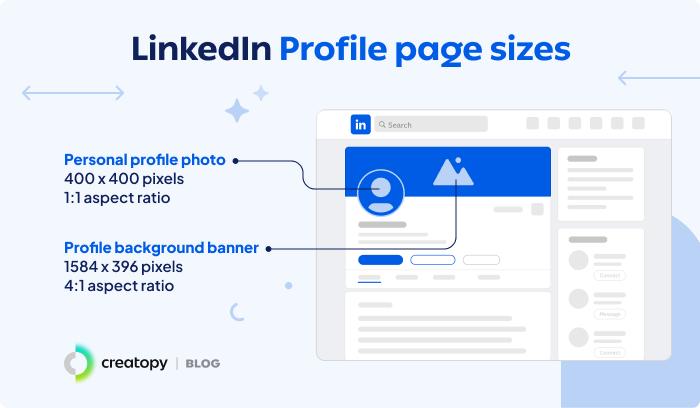
Having an optimized LinkedIn profile page is a must nowadays, whether you’re actively looking for a job or just want to build your professional presence and network.
You can make a powerful first impression with a high-quality profile picture and LinkedIn background banner that fully conveys your personality.
What is the best background for LinkedIn?
For LinkedIn profile pages, the best background image would be a picture that includes your contact details, a headline about yourself, and a significant achievement that you’re proud of.
For LinkedIn company pages, the best background image would be a cover that contains a picture of your headquarters/team/services, and a powerful headline (it can be your company’s slogan).
LinkedIn profile picture size
- Recommended resolution: 400 x 400 pixels
- Aspect ratio: 1:1
- Supported file types: JPG and PNG
Tips:
LinkedIn recommends uploading a profile picture of 400 x 400 pixels, aspect ratio of 1:1, and a file size of up to 8MB. However, you can upload an image bigger than the recommended size as long as it’s within the 8MB size limit.
Also, bear in mind that your profile picture will be cropped to a circle.
LinkedIn banner size
The LinkedIn banner is your opportunity to impress recruiters visiting your profile. The header is an intro to your unique world, where you can show your personality, skills, and values. Here are the specifications for the LinkedIn header size:
- Recommended resolution: 1584 x 396 pixels
- Aspect ratio: 4:1
- Maximum file size: 8MB
- Supported file types: JPG and PNG
Tips:
Your LinkedIn profile background will be displayed differently on desktop and mobile. Therefore, check how the image looks on different devices. In Creatopy, you can make a background banner for LinkedIn in minutes using the LinkedIn banner creator.
2. LinkedIn Company Page Sizes
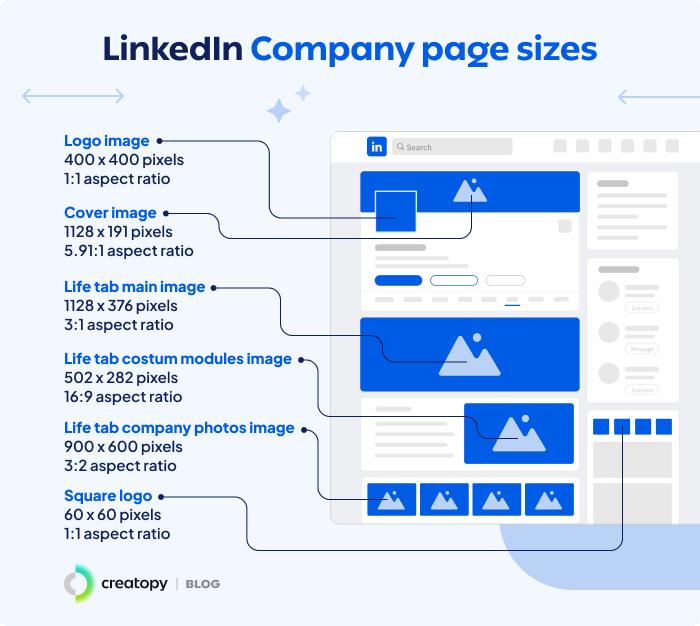
LinkedIn profile pages and LinkedIn company pages have different image specs. Find all the LinkedIn image specs for company pages in this chapter.
For companies and organizations, the LinkedIn page is a vital element in building a strong online presence.
Therefore, you need to use high-quality visuals that convey your brand’s personality and core values.
LinkedIn company logo size
- Recommended resolution: 400 x 400 pixels
- Minimum resolution: 268 x 268 pixels
- Aspect ratio: 1:1
- Maximum file size: 3MB
- Supported file formats: PNG, JPEG
LinkedIn cover photo size
If you don’t upload a cover photo to your page, LinkedIn will automatically show a default dull, grey background that looks totally unprofessional. This is why it’s important to create a custom LinkedIn header image that reflects your brand. These are the specifications for the LinkedIn background photo size:
- Recommended resolution: 1128 x 191 pixels
- Minimum resolution: 1128 x 191 pixels
- Aspect ratio: 5.91:1
- Maximum file size: 3MB
- Supported file formats: PNG, JPEG
LinkedIn Life tab main image size
- Recommended resolution: 1128 x 376 pixels
- Minimum resolution: 1128 x 376 pixels
- Aspect ratio: 3:1
- Maximum file size: 3MB
- Supported file formats: PNG, JPEG
LinkedIn Life tab custom modules image size
- Recommended resolution: 502 x 282 pixels
- Minimum resolution: 502 x 282 pixels
- Aspect ratio: 16:9
- Maximum file size: 3MB
- Supported file formats: PNG, JPEG
LinkedIn Life tab company photos image size
- Recommended size: 900 x 600 pixels
- Minimum resolution: 264 x 176 pixels
- Aspect ratio: 3:2
- Maximum file size: 3MB
- Supported file formats: PNG, JPEG
LinkedIn square logo
- Minimum resolution: 60 x 60 pixels
- Aspect ratio: 1:1
Tips:
The LinkedIn cover will display differently on desktop and mobile devices. On mobile, the cover is covered by the profile picture on the left-hand side. So the best thing to do is to place your headline in the safe center area to prevent your message from being cut off.
The social media image guidelines above also apply to LinkedIn Showcase pages. These pages are designed to spotlight individual brands, business units or other initiatives.
Here are other resources about LinkedIn:
- LinkedIn background photo ideas
- LinkedIn advertising guide
- How to optimize your LinkedIn profile page
- Types of LinkedIn ads
- LinkedIn ad specs
3. LinkedIn Feed Updates Sizes
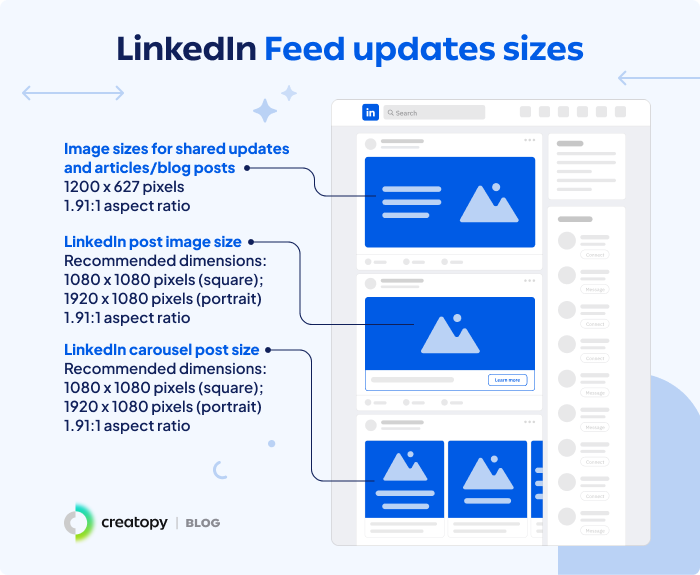
Using the correct LinkedIn image sizes will help you achieve a professional look and feel.
But don’t limit yourself to the profile page. Ensure all the visuals you publish on LinkedIn perfectly align with the platform’s specifications. That includes the shared updates, blog posts and images posts.
LinkedIn image sizes for shared updates and articles
This image appears on both LinkedIn personal profiles and company pages when you share a link. LinkedIn pulls this image from the Open Graph tags, just like all the other social media platforms. Here are the LinkedIn article image size specs:
- Recommended resolution: 1200 x 627 pixels
- Aspect ratio: 1.91:1
- Maximum file size: 5MB
Tips:
You can’t change the image for shared links from LinkedIn. Instead, what you can do is to alter the Open Graph piece of code from the source website.
If your Open Graph image meets the requirements but it’s still not displayed alongside your link, the source website could be blocking LinkedIn from grabbing the image, or the image may be located on a protected directory or website.
LinkedIn post image size
- Recommended LinkedIn post resolution: 1080 x 1080 pixels (square); 1920 x 1080 pixels (portrait)
- Aspect ratio: 1.91:1
LinkedIn carousel post size
- Recommended resolution: 1080 x 1080 pixels (square); 1920 x 1080 pixels (portrait)
- Aspect ratio: 1.91:1
4. LinkedIn Ad Sizes
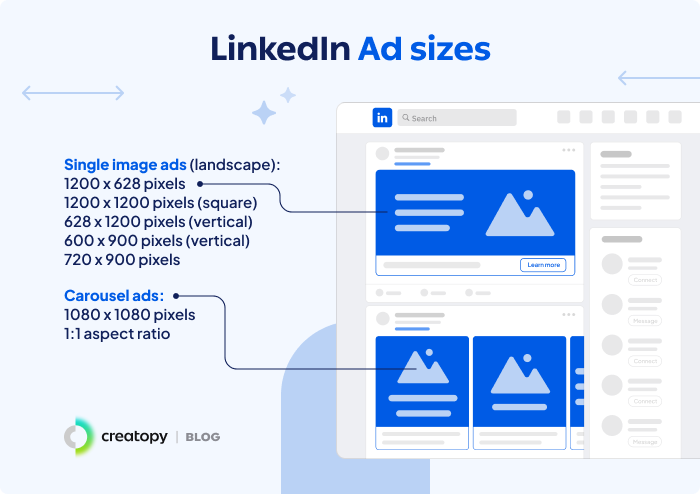
LinkedIn is a great platform to advertise your brand because of its unique member base made up of professionals and companies. With LinkedIn ads, you have access to the platform’s hundreds of millions of members and registered businesses all over the world.
In terms of results, B2B marketers say that LinkedIn ads are the most effective channel for driving high-quality leads. And brands admitted they have seen a 33% increase in purchase intent after potential customers have been exposed to LinkedIn ads.
LinkedIn ad image size
- Recommended resolution: 1200 x 628 pixels (landscape), 1.91:1 ratio; 1200 x 1200 pixels (square:), 1:1 ratio; 628 x 1200 pixels (vertical), ratio 1:1.91; 600 x 900 pixels (vertical), ratio 2:3; 720 x 900 pixels, 4:5 ratio
- File type: JPG, PNG or GIF
- Maximum file size: 5MB
LinkedIn carousel ad size
- Recommended resolution: 1080 x 1080 pixels
- Aspect ratio: 1:1
- File type: JPG or PNG
- Maximum carousel cards: 10
- Maximum file size: 10MB
InMail message ad size
- Recommended size: 300 x 250 pixels
- Accepted file types: JPG or PNG
- Maximum file size: 2MB
5. LinkedIn Event Page
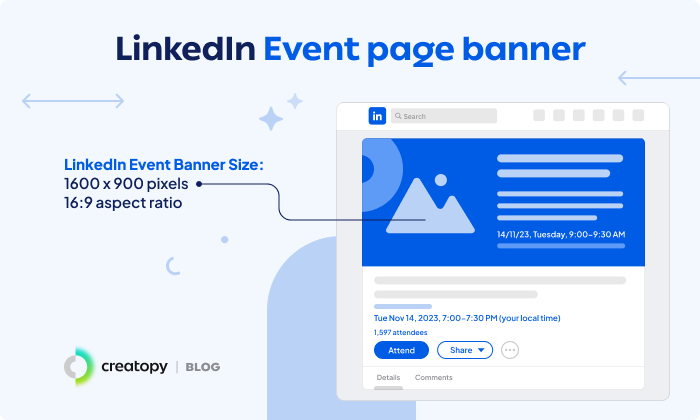
LinkedIn events are an excellent way for professionals to connect with other like-minded people or to attend seminars, workshops, and conferences.
On LinkedIn, you can organize two types of events:
- In-person events;
- Online events, which can be live, audio, or external events.
LinkedIn event banner size
- Recommended resolution: 1600 x 900 pixels
- Aspect ratio: 16:9
Key Takeaways
Your LinkedIn page is your digital business card to the world. Therefore, strive to convey professionalism. Use the recommended LinkedIn image sizes to achieve that and set the right impression from the start.
Also, remember to update your page periodically and return here for the best guidelines on LinkedIn image specs. We will be keeping this page updated.
Link nội dung: https://vinaenter.edu.vn/nen-banner-a78416.html